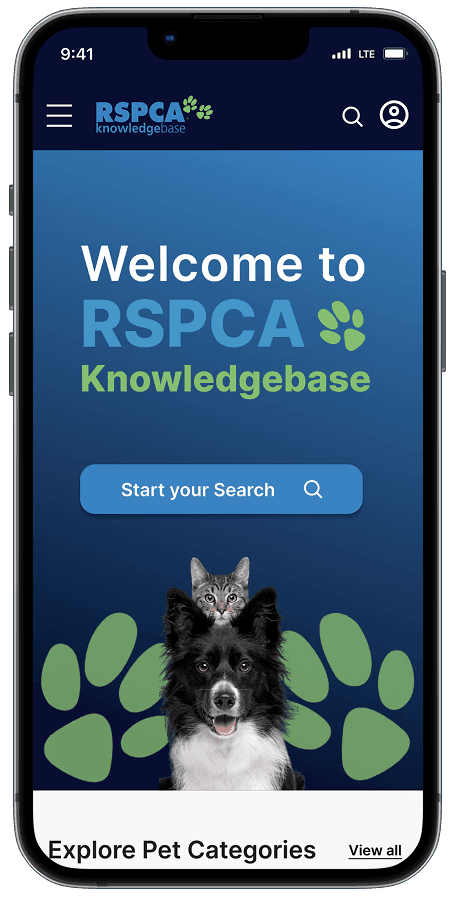
RSPCA Knowledge Base
A website where pet owners can look up information on animal welfare backed by science.
Project type: UX Design
Time frame: Sept - Dec 2025 (10 weeks)
Project role: Sole UX/UI designer (with support from my mentor, Candy Crawford)
Key skills: UX design, Heuristic analysis, User testing, User journey and Developer pack.
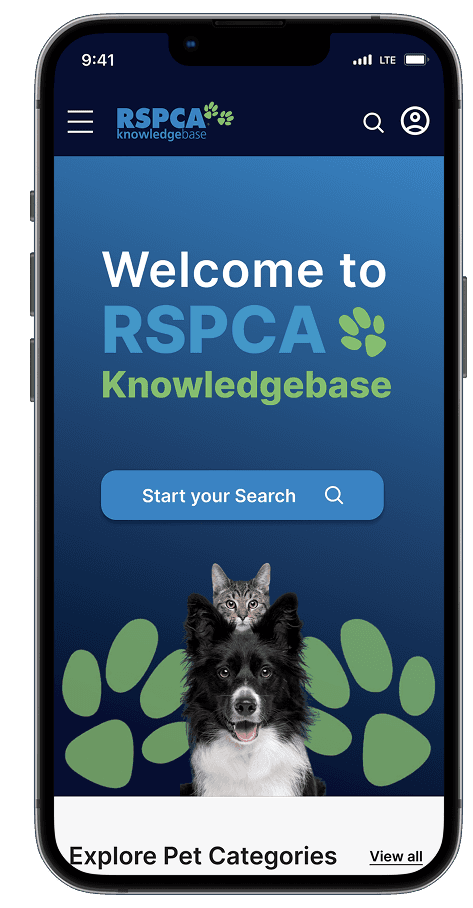
RSPCA Knowledge Base
A website where pet owners can look up information on animal welfare backed by science.
Project type: UX Design
Time frame: Sept - Dec 2025 (10 weeks)
Project role: Sole UX/UI designer (with support from my mentor, Candy Crawford)
Key skills: UX design, Heuristic analysis, User testing, User journey and Developer pack.
RSPCA Knowledge Base
A website where pet owners can look up information on animal welfare backed by science.
Project type: UX Design
Time frame: Sept - Dec 2025 (10 weeks)
Project role: Sole UX/UI designer (with support from my mentor, Candy Crawford)
Key skills: UX design, Heuristic analysis, User testing, User journey and Developer pack.
Project overview
Project overview
The client
The client
RSPCA is an independent community based charity focused on providing animal care and protection services across Australia. RSPCA works to make animals lives better through rehoming shelters, investigating animal cruelty and advocating for animal welfare.
RSPCA is an independent community based charity focused on providing animal care and protection services across Australia. RSPCA works to make animals lives better through rehoming shelters, investigating animal cruelty and advocating for animal welfare.
Knowledge Base is RSPCA's resource centre providing animal welfare and pet care advice. It serves pet owners, vet students, and farmers.
Knowledge Base is RSPCA's resource centre providing animal welfare and pet care advice. It serves pet owners, vet students, and farmers.
We interviewed Andrew, RSPCA’s Digital Marketing and Strategy Officer, to understanding Knowledge Base's challenges and goals.
We interviewed Andrew, RSPCA’s Digital Marketing and Strategy Officer, to understanding Knowledge Base's challenges and goals.
The problem
The problem
From this interview we gathered that, pet owners drive Knowledge Base's engagement. Yet, 90% don't return. The dense text and lack of visual guidance buries pet content among vet students and farmer content.
This means, pet owners aren't finding information on how to help themselves and their pets.
From this interview we gathered that, pet owners drive Knowledge Base's engagement. Yet, 90% don't return. The dense text and lack of visual guidance buries pet content among vet students and farmer content.
This means, pet owners aren't finding information on how to help themselves and their pets.
“The content on the site is too overwhelming for users. Theres a lot of scientific articles being featured.”
“The content on the site is too overwhelming for users. Theres a lot of scientific articles being featured.”
Stakeholder Interview quote by Andrew Curin
Stakeholder Interview quote by Andrew Curin
Design objective
Design objective
Increase time spent on Knowledge Base by 20% by prioritising pet content for pet owners through clear visual pathways.
Increase time spent on Knowledge Base by 20% by prioritising pet content for pet owners through clear visual pathways.
Project Outcome
Project Outcome
Pet owners find information twice as fast, reducing search friction and improving task success overall.
Pet owners find information twice as fast, reducing search friction and improving task success overall.
Constraints — Recruitment
Constraints — Recruitment
I conducted usability tests with 4 participants who had animal loving traits. However, if the possibility was presented, I'd have liked to conduct usability tests with pet owners who use RSPCA Knowledge Base. This would help me better understand their motivations and overall experience with the platform.
I conducted usability tests with 4 participants who had animal loving traits. However, if the possibility was presented, I'd have liked to conduct usability tests with pet owners who use RSPCA Knowledge Base. This would help me better understand their motivations and overall experience with the platform.
Research
Research
Previous research had been done
Victoria Tran conducted user research to identify the insights and challenges users are experiencing with Knowledge Base. The research was conducted on 7 participants (animal lover and 18+ years old) to better understand their behaviour, motivation, and challenges users came across when navigating Knowledge Base. Through this research Victoria identified 3 main themes:
Help is a hidden language
“I kept clicking around but couldn’t find what I needed. It just felt like information, not something for me.”
The tone of voice on the website is not reflective of the target audience. Without clear action orientated labels and visual cues, users missed opportunities to engage further.
Advocacy feels distant
3 out of 7 participants found that they couldn't connect to the pet content on the site. With content being buried in heavy text, statistics and reports, participants lacked the emotional impact to engage and return.
Exploration is dead
“After adoption, the information felt scattered, and I didn’t feel connected to the bigger cause. It was like the journey just stopped there.”
Participants emphasised there wasn't any "next steps" on the site to guide them. Without call to actions, participants experience on the site ended abruptly.
Previous research had been done
Victoria Tran conducted user research to identify the insights and challenges users are experiencing with Knowledge Base. The research was conducted on 7 participants (animal lover and 18+ years old) to better understand their behaviour, motivation, and challenges users came across when navigating Knowledge Base. Through this research Victoria identified 3 main themes:
Previous research had been done
Help is a hidden language
“I kept clicking around but couldn’t find what I needed. It just felt like information, not something for me.”
The tone of voice on the website is not reflective of the target audience. Without clear action orientated labels and visual cues, users missed opportunities to engage further.
Advocacy feels distant
3 out of 7 participants found that they couldn't connect to the pet content on the site. With content being buried in heavy text, statistics and reports, participants lacked the emotional impact to engage and return.
Exploration is a dead end
“After adoption, the information felt scattered, and I didn’t feel connected to the bigger cause. It was like the journey just stopped there.”
Participants emphasised there wasn't any "next steps" on the site to guide them. Without call to actions, participants experience on the site ended abruptly.
We need to do our OWN research
To understand Knowledge Base’s strengths and weaknesses, we conducted an heuristic evaluation using Nielsen Norman Group’s usability principles. We also carried out a competitive analysis to identify potential usability opportunities.
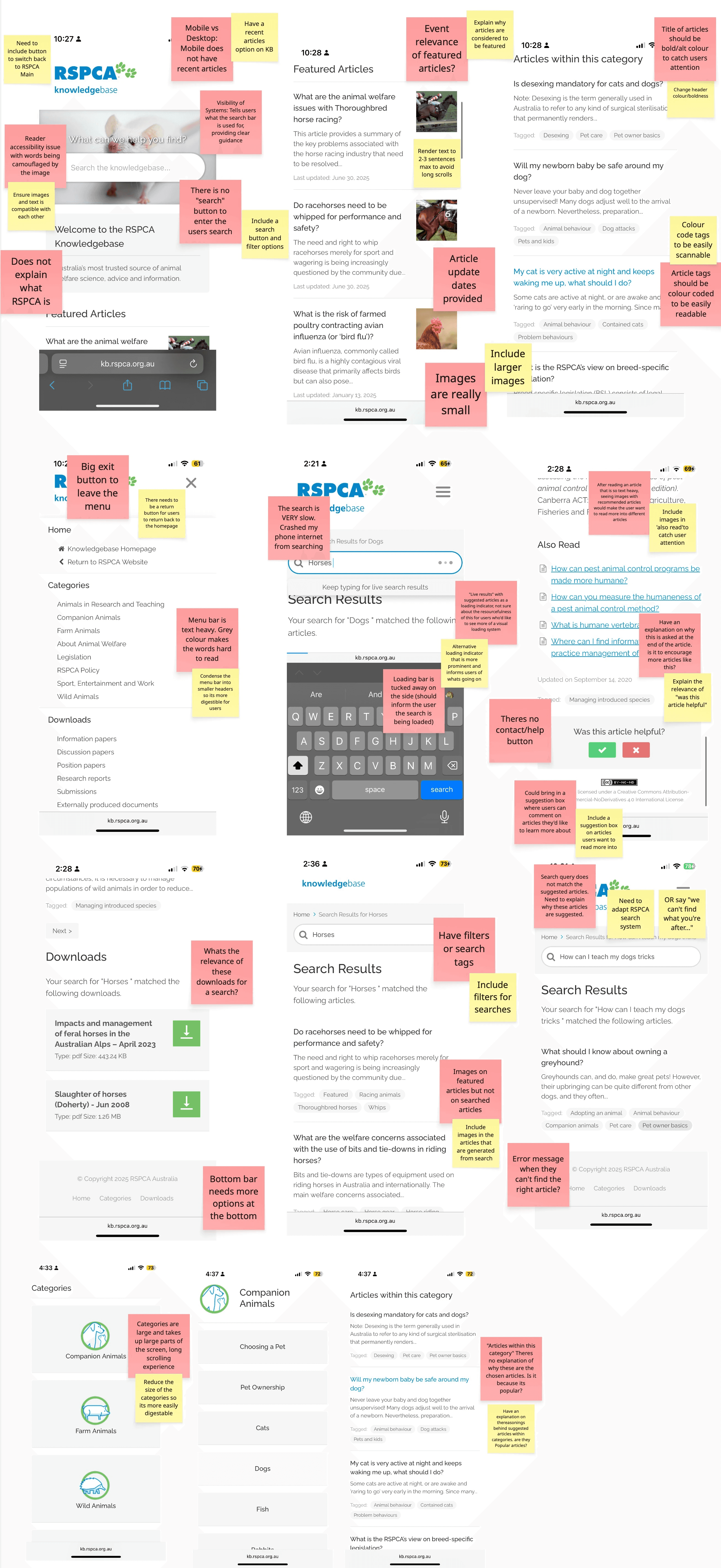
Heuristic Analysis - Key Takeaways
Homepage & Article navigation
There is a lack of direction when navigating Knowledge Base as there isn't any clear call to action and visual cues in each pathway.
Buttons needed for "search" and to "return" are missing, making users rely on their phones default keyboard.
Language
The language used does not suit pet owners. Terms like "downloads" and "legislation" can be considered vague as they are more suited for academic resources (as informed by usability tests in this project).
Search & Accessibility
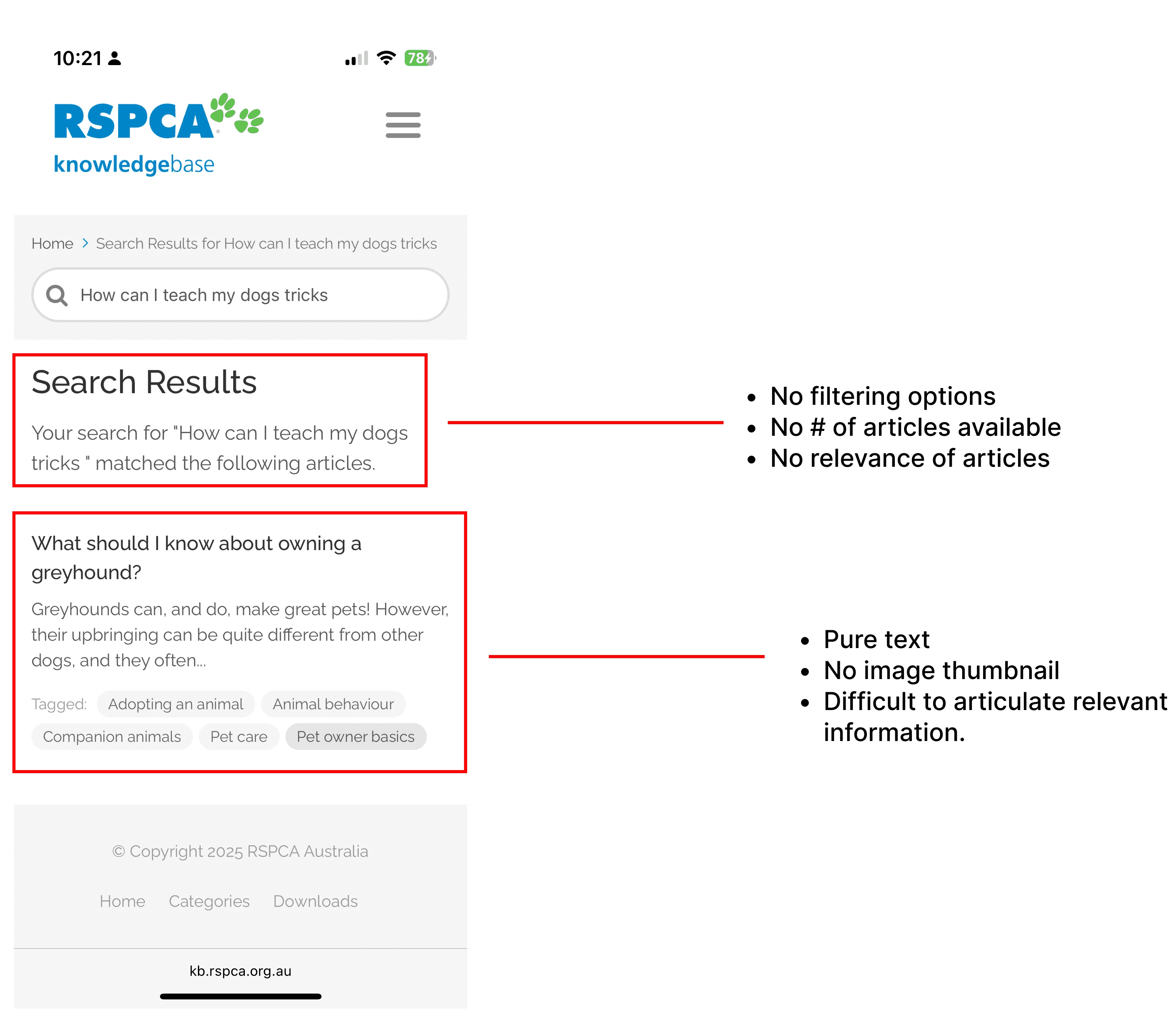
Article results are mixed from farm animal content to greyhound racing. There's no filtering options to specify a users search.
The text size for articles is small, grey and compact making it difficult to read and to skim through.
Heuristic Evaluation - Key takeaways
Homepage & Article navigation
There is a lack of direction when navigating Knowledge Base as there isn't any clear call to action and visual cues in each pathway.
Buttons needed for "search" and to "return" are missing, making users rely on their phones default keyboard.
Language
The language used does not suit pet owners. Terms like "downloads" and "legislation" can be considered vague as they are more suited for academic resources (as informed by usability tests in this project).
Search & Accessibility
Article results are mixed from farm animal content to greyhound racing. There's no filtering options to specify a users search.
The text size for articles is small, grey and compact making it difficult to read and to skim through.
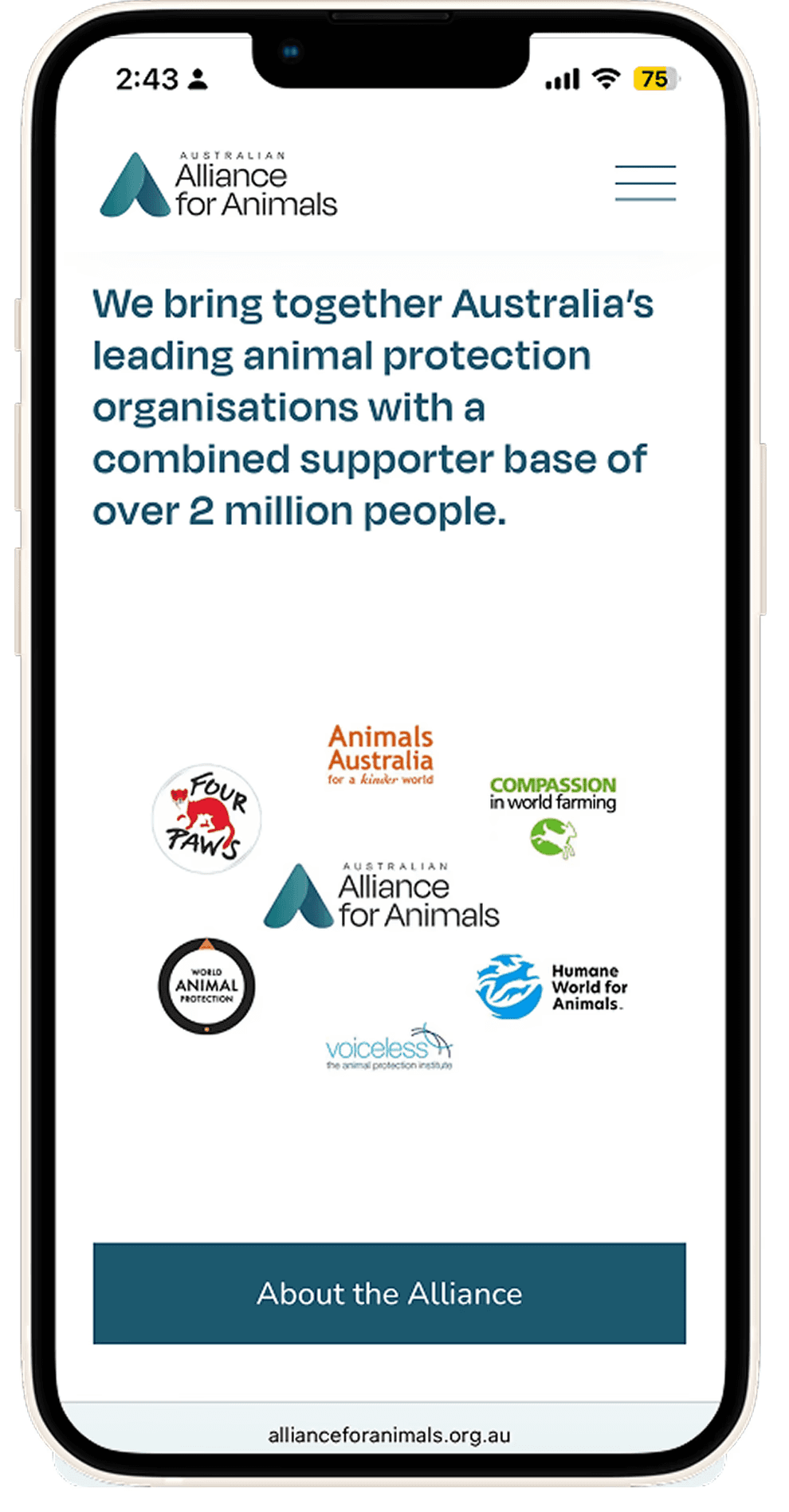
Alliance for Animals is an Australian charity and coalition of leading animal organisations working to reform the animal welfare system. Their aim is to change laws that currently treat animal welfare as a minor concern.
Design insight
Upon first scroll, Alliance for Animals communicates its purpose by helping users understand who the organisation is and why it exists. This clarity supports users trust and gives them an immediate reason to continue engaging.
How this informs my design
This showed me the importance of leading with a clear purpose statement in Knowledge Base, allowing users to quickly understand the purpose behind the page.
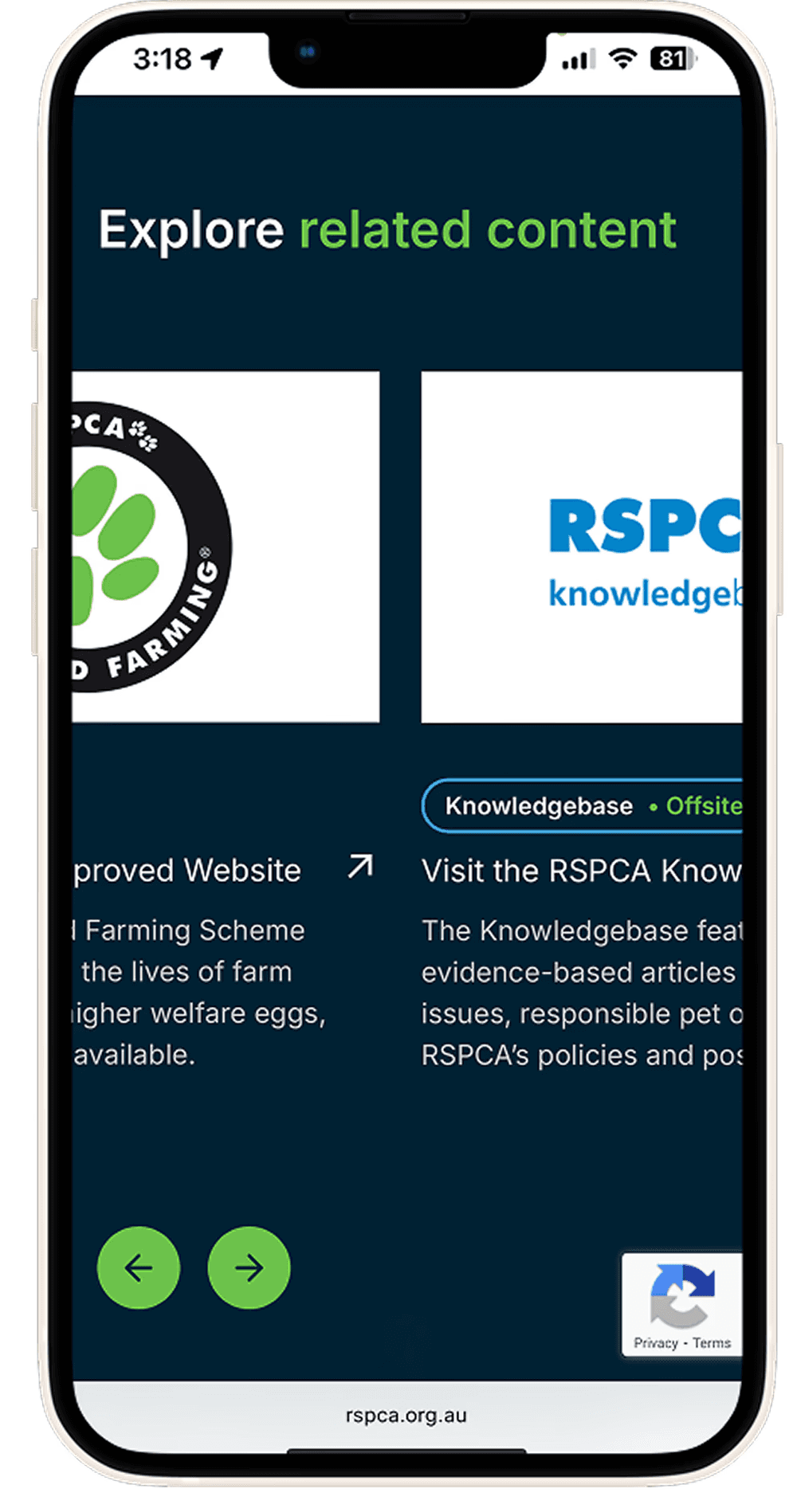
RSPCA works to make animals lives better through rehoming shelters,investigating animal cruelty and advocating for animal welfare.Design insight
The related-articles carousel gives users a simple way to explore connected topics without losing visibility of their options, supporting easy scanning and further engagement.
How this informs my design
Since users often scan rather than read deeply, carousels make related content visually obvious with short titles, clear labels, and strong hierarchy. This encourages users to explore more.
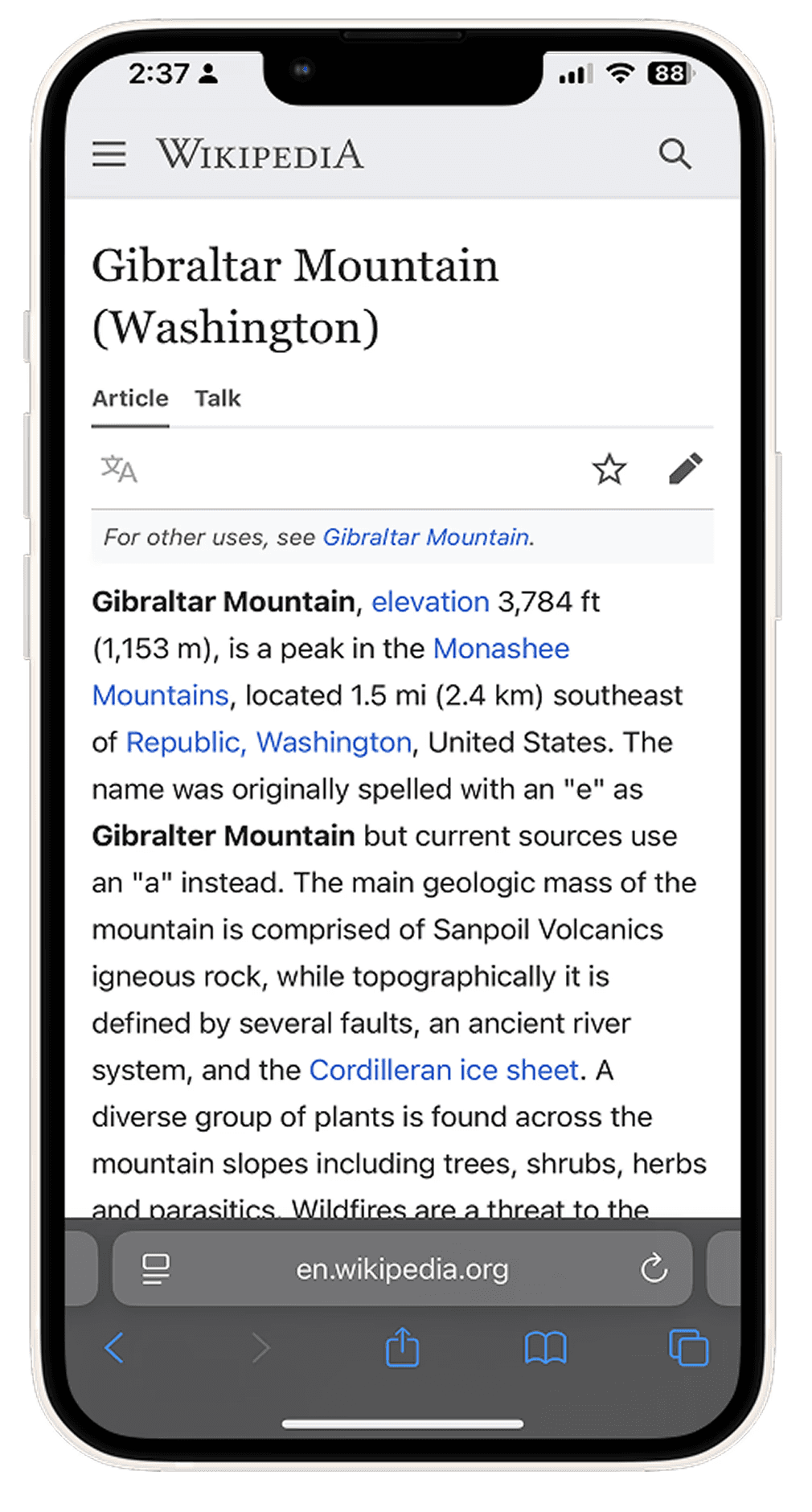
I conducted heuristic evaluation on The Guardian and Wikipedia to discover article features for content heavy sites.
Wikipedia is a resource centre containing millions of articles.
Design insight
Wikipedia uses clear headers, strong font sizes and tabs to organise dense content efficiently. This prioritises article comprehension with a scannable layouts, letting users grasp the page.
How this informs my design
This structure provides insight to prioritising content hierarchy and text density.
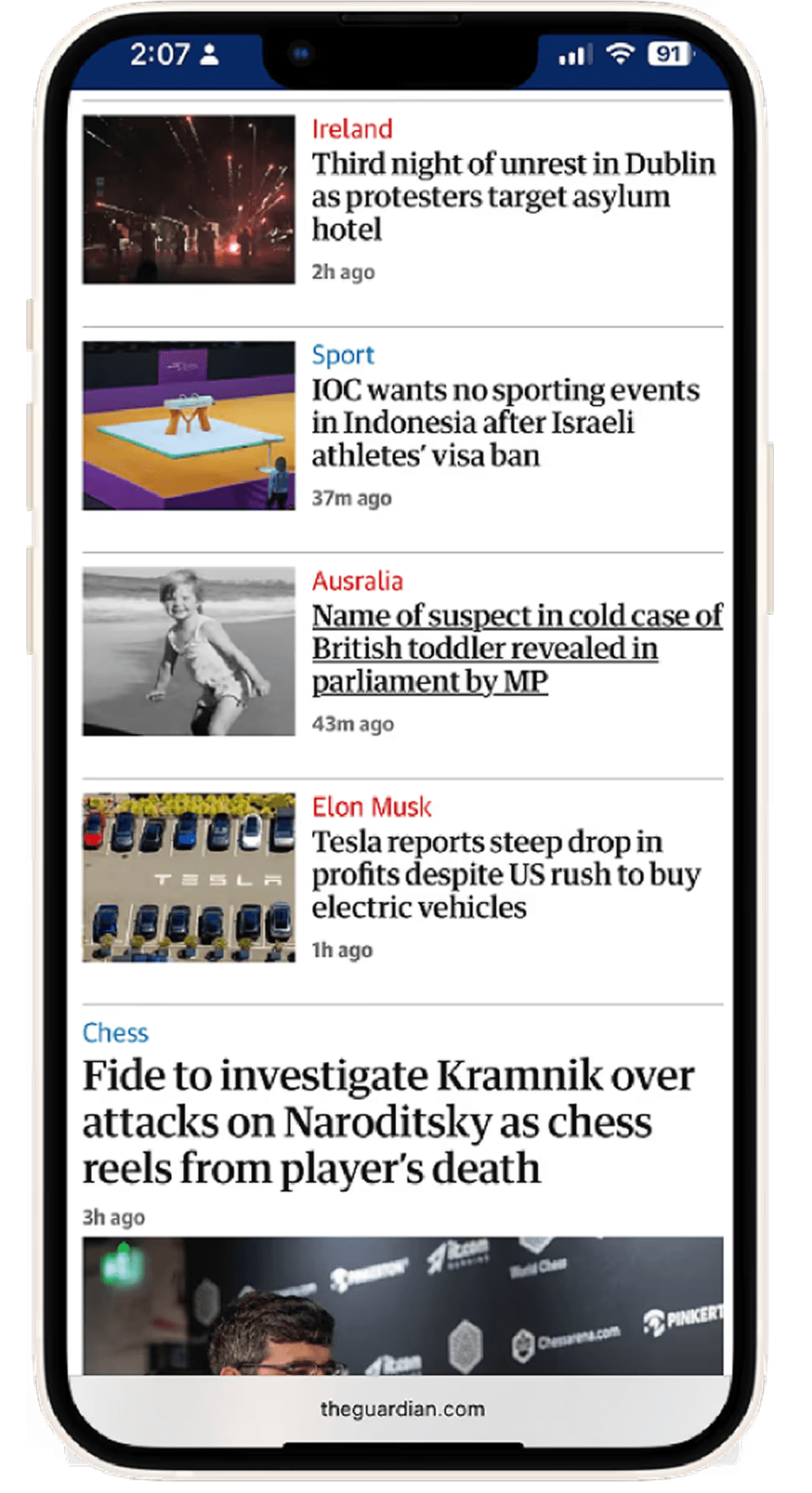
The Guardian is a British daily newspaper and global digital news organisation.Design insight
The Guardian uses a ‘Discover’ layout showing multiple articles in one scroll. With bold headers and colour coded tags, it lets users quickly assess article relevancy.
How this informs my design
For my design, I'll be using bold headers and colour coding to categorise relevant articles together.
Competitive Analysis
Alliance for Animals is an Australian charity and coalition of leading animal organisations working to reform the animal welfare system. Their aim is to change laws that currently treat animal welfare as a minor concern.
Design insight
Upon first scroll, Alliance for Animals communicates its purpose by helping users understand who the organisation is and why it exists. This clarity supports users trust and gives them an immediate reason to continue engaging.
How this informs my design
This showed me the importance of leading with a clear purpose statement in Knowledge Base, allowing users to quickly understand the purpose behind the page.
RSPCA works to make animals lives better through rehoming shelters, investigating animal cruelty and advocating for animal welfare.
Design insight
The related-articles carousel gives users a simple way to explore connected topics without losing visibility of their options, supporting easy scanning and further engagement.
How this informs my design
Since users often scan rather than read deeply, carousels make related content visually obvious with short titles, clear labels, and strong hierarchy. This encourages users to explore more.
I conducted heuristic evaluation on The Guardian and Wikipedia to discover article features for content heavy sites.
Wikipedia is a resource centre containing millions of articles.
Design insight
Wikipedia uses clear headers, strong font sizes and tabs to organise dense content efficiently. This prioritises article comprehension with a scannable layouts, letting users grasp the page.
How this informs my design
This structure provides insight to prioritising content hierarchy and text density.
The Guardian is a British daily newspaper and global digital news organisation.
Design insight
The Guardian uses a ‘Discover’ layout showing multiple articles in one scroll. With bold headers and colour coded tags, it lets users quickly assess article relevancy.
How this informs my design
For my design, I'll be using bold headers and colour coding to categorise relevant articles together.
Ideation
Ideation
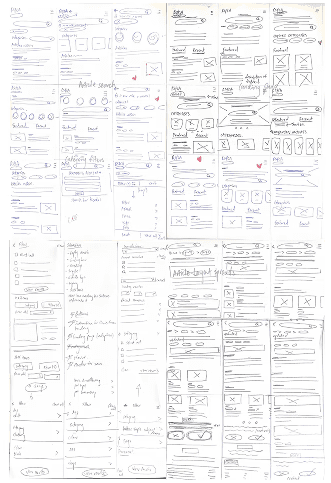
After conducting research, I moved on to sketches. I wanted to explore ideas that made Knowledge Base simpler to navigate especially with search queries. So I asked myself:
How might we encourage pet owners to explore and return to Knowledge Base?
I explored ideas using the Crazy 8 method, experimenting with content hierarchies through imagery and text. Experimenting this way allowed me to configurate layouts and components that prioritised a navigation flow specifically for pet owners.
I wanted to prioritise pet content and articles for animal carers. I did this by:
Tailoring the home screen with pet related articles and components.
Created a dedicated filters section allowing users to narrow content by pet type, topic, or care need.
Explored multiple layout grid configurations to help users browse and discover related articles.
Experimented with component scroll patterns throughout the homepage to maintain engagement and interest.
Refined the category buttons to be smaller and more thumb friendly, enabling quick browsing between content types.
After conducting research, I moved on to sketches. I wanted to explore ideas that made Knowledge Base simpler to navigate especially with search queries. So I asked myself:
How might we encourage pet owners to explore and return to Knowledge Base?
I explored ideas using the Crazy 8 method, experimenting with content hierarchies through imagery and text. Experimenting this way allowed me to configurate layouts and components that prioritised a navigation flow specifically for pet owners.
I wanted to prioritise pet content and articles for animal carers. I did this by:
Tailoring the home screen with pet related articles and components.
Created a dedicated filters section allowing users to narrow content by pet type, topic, or care need.
Explored multiple layout grid configurations to help users browse and discover related articles.
Experimented with component scroll patterns throughout the homepage to maintain engagement and interest.
Refined the category buttons to be smaller and more thumb friendly, enabling quick browsing between content types.
Wireframes
Home page
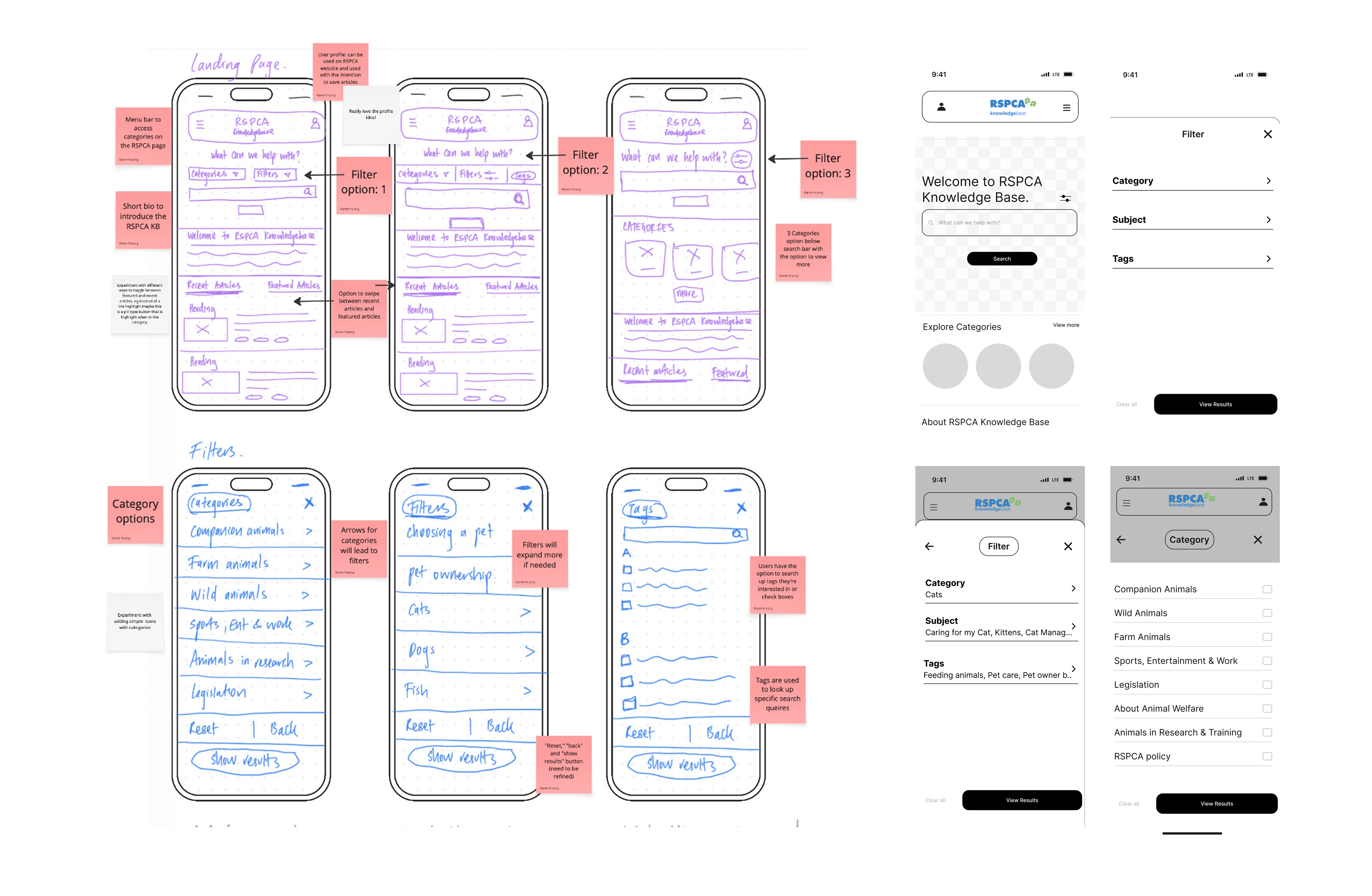
Website analytics provided by Andrew revealed that 65.4% of users begin their search on the home page. To capitalise on this existing behaviour, I centred the search bar as the focal point of the landing screen, creating a strong call to action that immediately directs users toward search.
Filter
Search results for articles comes up with a list of articles that aren't related to a users search. To refine the users search query, a step by step filter section was designed.
Search Results
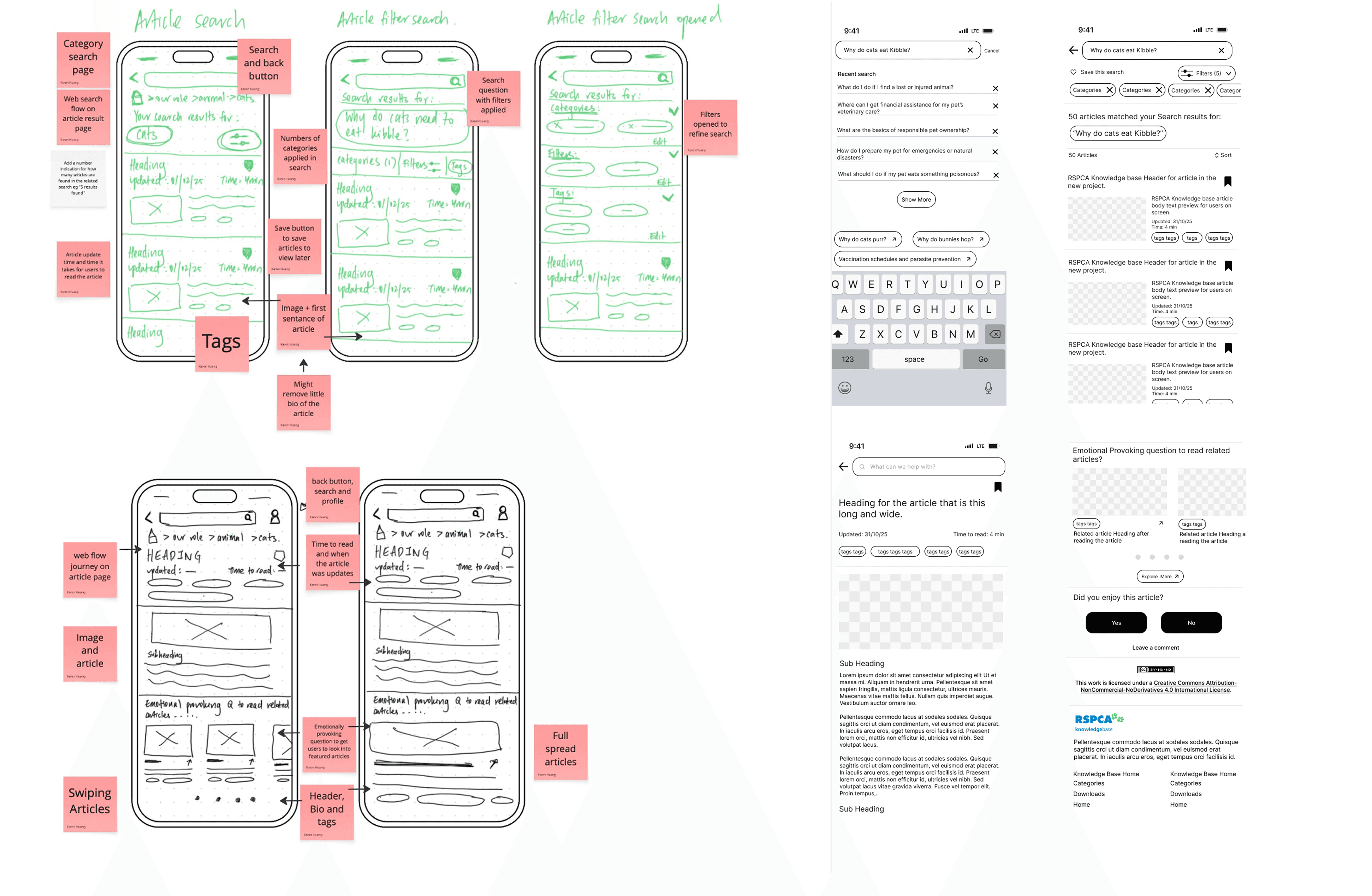
The current search results is a wall of text. Having to read the header and the first two lines of an article multiple times can be exhausting.
The article cards I designed consists of an image and a header, that way there isn't an information overload, so that each card is digestible when scrolling.
Article Layout
From website analytics, 22.3% of users reach Knowledge Base through direct article links. This is many users first impression of the website.
At the end of each article, I integrated call to action prompts like "related articles" to get users to explore further into Knowledge Base.
Wireframes
Home page
Website analytics provided by Andrew revealed that 65.4% of users begin their search on the home page. To capitalise on this existing behaviour, I centred the search bar as the focal point of the landing screen, creating a strong call to action that immediately directs users toward search.
Filter
Search results for articles comes up with a list of articles that aren't related to a users search. To refine the users search query, a step by step filter section was designed.
Search results
The current search results is a wall of text. Having to read the header and the first two lines of an article multiple times can be exhausting.
The article cards I designed consists of an image and a header, that way there isn't an information overload, so that each card is digestible when scrolling.
Article Layout
From website analytics, 22.3% of users reach Knowledge Base through direct article links. This is many users first impression of the website.
At the end of each article, I integrated call to action prompts like "related articles" to get users to explore further into Knowledge Base.
Usability tests
Usability tests
Gathering user feedback
Gathering user feedback
To test my prototype, I recruited 4 participants (3 in person & 1 online) from my circle to conduct usability tests. All participants possessed animal loving traits. I used a mid-fi prototype to test components and issues users were experiencing.
The goal of these usability tests was to evaluate the functionality and usability of the filters section, and to determine whether the designs would resonate with pet owners enough to encourage return visits to the site.
To test my prototype, I recruited 4 participants (3 in person & 1 online) from my circle to conduct usability tests. All participants possessed animal loving traits. I used a mid-fi prototype to test components and issues users were experiencing.
The goal of these usability tests was to evaluate the functionality and usability of the filters section, and to determine whether the designs would resonate with pet owners enough to encourage return visits to the site.
To start: I tasked participants to explore the home page and evaluate whether the content felt relevant and engaging to them.
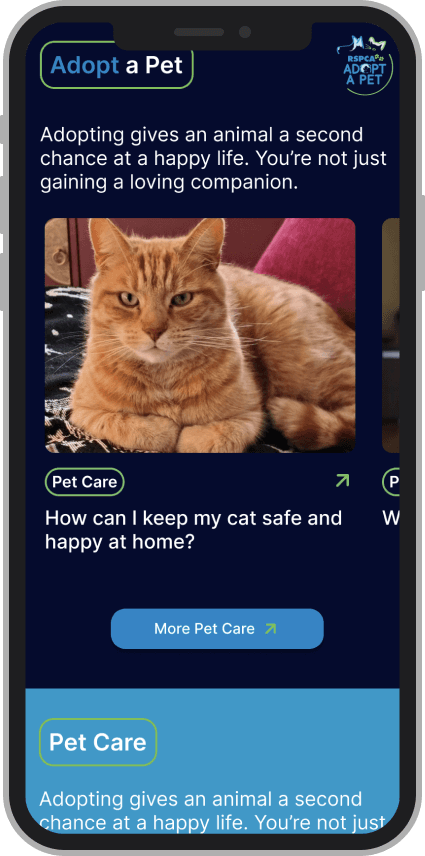
Mid-fi carousel showing the two pet carousels.
Observation
80% of users liked having pet related articles categorised in their own topic. Having the option to swipe through articles that interested them in that topic gave them scrolling ease.
Insight
All users thought ‘Adopt a Pet’ and ‘Pet Care’ were the same categories. Without differentiating the layout, it made it harder for users to recognise each section was a different topic.
Design decision
I differentiated the layout by personalising each category through components, quizzes and colour giving each section an identity of its own.
"I want "this" and "this" to look different from each other (article sections). You could literally change this to like ‘thinking about adoption?’ and then I feel like it would call back to adoption articles more."
Interview quote from usability tests
Task 2: I tasked participants to "start their search" from the home page. engaging to them.
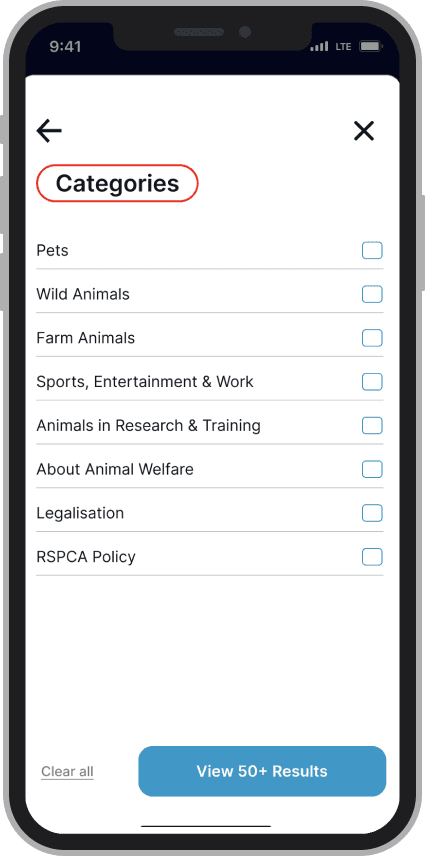
Mid-fi filter showing page with terms that confuse users.
Observation
Using colours to differentiate "categories" in the filter allowed users to identify what part of the filters section they’re on. All users liked that this feature differentiated what they're looking at.
Insight
All users questioned what certain terms mean’t like "downloads" or "animals in research and teaching." This language made users wonder what the relevance of it is to pet owners, adding confusion to their search.
Design decision
I simplified the filters section by either removing or shifting terminology that wasn't relevant to a pet owner's search. I replaced these with language that aligned with what users would naturally look for to reduce confusion.
E.g: Animals in research and teaching —> Animals in research and testing
"What’s the relevance of that to me, as a casual pet owner?"
Interview quote from usability tests
Task 3: I tasked participants to incorporate filters in their search query.
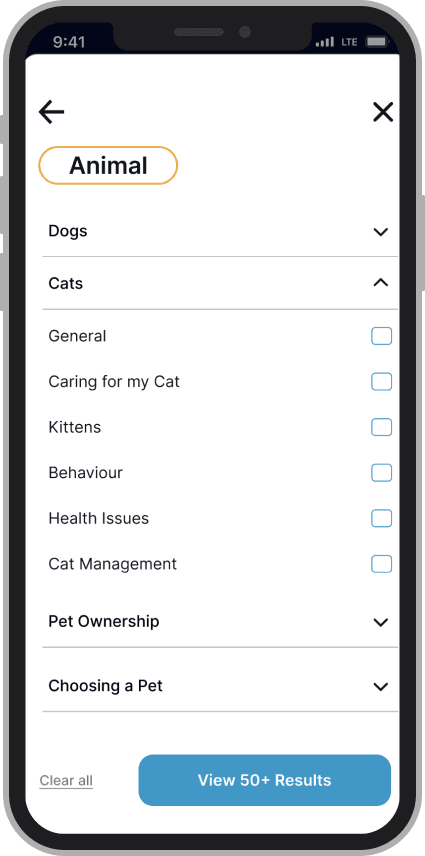
Mid-fi filter with visually confusing and overwhelming elements.
Observation
The tests found that users liked having filters laid out with its categories in its own section. Having a brief description provided users guidance on the functionality of the page.
Insight
All users found themselves pressing the ‘filter’ header, thinking it was a button. This feature created a visually confusing component of what is and isn’t a button.
Users also didn’t understand the relevance of tags and was overwhlemed by the amount of toggles in the filters section.
Design decision
I simplified the filters section by reducing the number of toggle options, while also resolving the visual confusion around the 'filter' header. I redesigned it to be clearly distinguishable from interactive buttons.
I also removed the tags section in the filters and replaced it with animal topic to simplify the filtering process.
"This feels like a button, I think, probably because of the outline."
Interview quote from usability tests
Task 4: I tasked participants to look for an article and to read it.
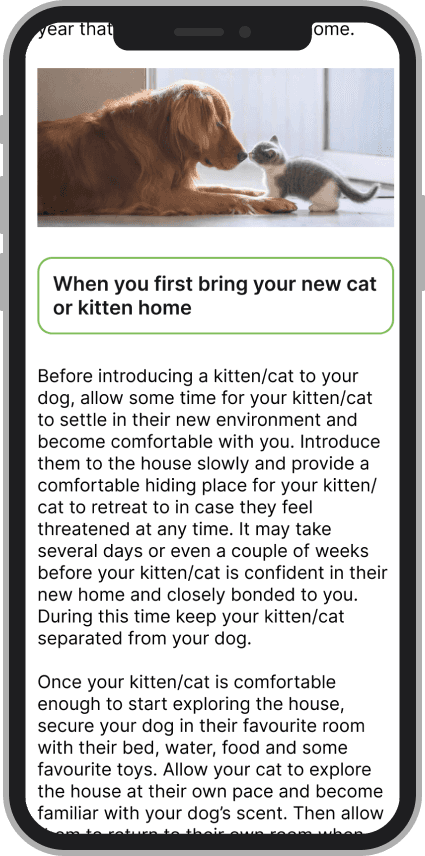
Mid-fi filter articles layout with subheading and text.
Observation
80% of users liked that there were images throughout the article to providing a visual break between text. The current Knowledge Base articles consists of only one image at the very beginning of the article.
Insight
All users didn’t like the sub headings being in a button format. It made it appear as a button. Furthermore, the text being a larger font size within big paragraphs made it overwhelming for users to read.
Design decision
Paragraphs are broken up into smaller sections, while font sizes were altered to be smaller to accommodate readability on the screen. Sub headings were also distinguished away from appearing as a button..
“I’m just not used to the huge blocks of text, especially with the font size being so large."
Interview quote from usability tests
To start: I tasked participants to explore the home page and evaluate whether the content felt relevant and engaging to them.
Observation
80% of users liked having pet related articles categorised in their own topic. Having the option to swipe through articles that interested them in that topic gave them scrolling ease.
Insight
All users thought ‘Adopt a Pet’ and ‘Pet Care’ were the same categories. Without differentiating the layout, it made it harder for users to recognise each section was a different topic.
Design decision
I differentiated the layout by personalising each category through components, quizzes and colour giving each section an identity of its own.
"I want "this" and "this" to look different from each other (article sections). You could literally change this to like ‘thinking about adoption?’ and then I feel like it would call back to adoption articles more."
Interview quote from usability tests
Mid-fi carousel showing the two pet carousels.
Task 2: I tasked participants to "start their search" from the home page.
Observation
Using colours to differentiate "categories" in the filter allowed users to identify what part of the filters section they’re on. All users liked that this feature differentiated what they're looking at.
Insight
All users questioned what certain terms mean’t like "downloads" or "animals in research and teaching." This language made users wonder what the relevance of it is to pet owners, adding confusion to their search.
Design decision
I simplified the filters section by either removing or shifting terminology that wasn't relevant to a pet owner's search. I replaced these with language that aligned with what users would naturally look for to reduce confusion.
E.g: Animals in research and teaching —> Animals in research and testing
"What’s the relevance of that to me, as a casual pet owner?"
Interview quote from usability tests
Mid-fi filter showing page with terms that confused users.
Task 3: I asked participants to incorporate filters in their search query.
Observation
The tests found that users liked having filters laid out with its categories in its own section. Having a brief description provided users guidance on the functionality of the page.
Insight
All users found themselves pressing the ‘filter’ header, thinking it was a button. This feature created a visually confusing component of what is and isn’t a button.
Users also didn’t understand the relevance of tags and was overwhlemed by the amount of toggles in the filters section.
Design decision
I simplified the filters section by reducing the number of toggle options, while also resolving the visual confusion around the 'filter' header. I redesigned it to be clearly distinguishable from interactive buttons.
I also removed the tags section in the filters and replaced it with animal topic to simplify the filtering process.
"This feels like a button, I think, probably because of the outline."
Interview quote from usability tests
Mid-fi filter with visually confusing and overwhelming elements.
Task 4: I asked participants to look for an article and to read it.
Observation
80% of users liked that there were images throughout the article to providing a visual break between text. The current Knowledge Base articles consists of only one image at the very beginning of the article.
Insight
All users didn’t like the sub headings being in a button format. It made it appear as a button. Furthermore, the text being a larger font size within big paragraphs made it overwhelming for users to read.
Design decision
Paragraphs are broken up into smaller sections, while font sizes were altered to be smaller to accommodate readability on the screen. Sub headings were also distinguished away from appearing as a button.
“I’m just not used to the huge blocks of text, especially with the font size being so large."
Interview quote from usability tests
Mid-fi articles layout with subheading and text.
Final Prototype
Final Prototype
I redesigned Knowledge Base with 3 principles:
I redesigned Knowledge Base with 3 principles:
Specifying the content
Information hierarchy
Simplification
Specifying the content
Information hierarchy
Simplification
Results:
Results:
These key updates removed 80% of users cognitive load because it prioritised relevant information first.
—> Testing shows that users are able to complete a search AND find a specific articles 2x faster.
These key updates removed 80% of users cognitive load because it prioritised relevant information first.
—> Testing shows that users are able to complete a search AND find a specific articles 2x faster.
Home page
The home page is centre with a button as a call to action to prompt users to start their search.
Pet categories and pet related content is readily available.
Filter search
Users can use the filter to specify their search.
Users can return back to the main filter page to continue filtering or start their search whenever by clicking "view results."
Filter
Users have access to the filters they applied to their search.
Users can edit and delete the filters depending on their needs.
Article
The articles layout consists of smaller texts and sub headings.
At the end of the article, call to action components are integrated to encourage users to continue exploring Knowledge Base.
80% of users said they liked that there were suggested related articles at the end.
Home page
The home page has a button as a call to action to prompt users to start
Pet categories and pet related content is readily available.
Filter search
Users can use the filter to specify their search.
Users can return back to the main filter page to continue filtering or start their search whenever by clicking "view results."
Filter
Users have access to the filters they applied to their search.
Users can edit and delete the filters depending on their needs.
Article
The articles layout consists of smaller texts and sub headings
At the end of the article, call to action components are integrated to encourage users to continue exploring Knowledge Base.
80% of users said they liked that there were suggested related articles at the end.
Reflection
Reflection
What I learn't
What I learn't
Breaking down and organising dense information into clear, digestible sections made Knowledge Base more accessible to navigate. This allowed users to find what they needed, without feeling overwhelmed.
Breaking down and organising dense information into clear, digestible sections made Knowledge Base more accessible to navigate. This allowed users to find what they needed, without feeling overwhelmed.
I strengthened my understanding of design systems by working with spacing, grids, and frames. Learning how to use these tools effectively helped me build consistent layouts and scalable components, which made my design more cohesively as the project grew.
I strengthened my understanding of design systems by working with spacing, grids, and frames. Learning how to use these tools effectively helped me build consistent layouts and scalable components, which made my design more cohesively as the project grew.
This project helped developed my user centered design thinking. It challenged me to turn user feedback into actionable user flows and to keep questioning my design decisions to better meet user needs.
This project helped developed my user centered design thinking. It challenged me to turn user feedback into actionable user flows and to keep questioning my design decisions to better meet user needs.
Feedback
Feedback
Andrew Curin - RSPCA’s Digital Marketing and Strategy Officer
"The category organisation and pet colour coding was not only visually pleasing but also accessibility friendly. It makes the categories more intuitive and easy to navigate."
Candy Crowhurst - Senior UX designer, Mentor
"You did an excellent job highlighting accessibility issues within the current RSPCA Knowledge Base. This demonstrated a strong understanding of inclusive design principles and the importance of designing for a broad range of users."
Andrew Curin - RSPCA’s Digital Marketing and Strategy Officer
"The category organisation and pet colour coding was not only visually pleasing but also accessibility friendly. It makes the categories more intuitive and easy to navigate."
Candy Crowhurst - Senior UX designer, Mentor
"You did an excellent job highlighting accessibility issues within the current RSPCA Knowledge Base. This demonstrated a strong understanding of inclusive design principles and the importance of designing for a broad range of users."
The Big Feed
Helping young adults see the impact of giving to increase donation motivations.
Karen Huang
Thank you for your interest in my work!
If you're looking for a UX Designer with a sense of humour, send me a message, I'd love to connect.
Lets chat
Projects
Download
The Big Feed
Helping young adults see the impact of giving to increase donation motivations.
View Project
Youngster
Designing a sign up flow that encourages young people to complete.
View Project
Karen Huang
Thank you for your interest in my work!
If you're looking for a UX Designer with a sense of humour, send me a message, I'd love to connect.
Lets chat
Karen Huang
Thank you for your interest in my work!
If you're looking for a UX Designer with a sense of humour, send me a message, I'd love to connect.
Lets chat